Chapter 1 — The Problem: One at a Time Doesn't Scale
When I joined MSPH, publishers uploaded videos one at a time. Select a file, fill in metadata, hit upload, wait, repeat. When you're pushing three videos a week, this works fine.
But the platform was growing. Video was becoming the primary content format, and publishers were starting to need 10, 20, even 50+ uploads in a single session. The one-at-a-time workflow simply couldn't keep up — not because the upload itself was slow, but because the entire interaction model assumed you only ever had one file to think about.
That was the original problem. Not status. Not errors. Not scale. Just: you can only do one thing at a time, and one thing at a time no longer works.
What broke when volume grew
Once we started building for batch, a second layer of problems surfaced — problems that had always existed but were invisible at single-file scale:
- No batch staging — publishers couldn't review or edit metadata across multiple files before committing
- No status architecture — "uploading" and "done" were the only states. With one file, you can track that in your head. With fifty, you can't. There was no way to distinguish between a file still processing, one submitted, one that failed to upload, and one rejected during publishing
- No error granularity — a single file failing gives you one error to deal with. Fifty files failing gives you fifty identical generic errors with no actionable detail
- No scale consideration — nobody had designed for what the UI should look like with 50+ files in play
This wasn't a "make upload faster" brief. It was a "redesign the interaction model for a platform that outgrew its original assumptions" problem.
The answer was clear: batch upload. Let publishers select and manage multiple files in a single session.
But introducing batch didn't just solve the volume problem — it surfaced an entirely new design challenge: how do you communicate the state of fifty things at once? That question became the foundation of everything that followed.
Chapter 2 — The State Architecture: Making the System Honest
The core design decision — the one that shaped everything else — was defining a state model that mapped to user cognition, not engineering implementation.
Why this mattered
Engineers think in terms of process states: a file is in a queue, being processed, or done. But users think in terms of meaning: did my thing work? Do I need to do something? What went wrong?
These aren't the same question. An engineer's "done" might mean "uploaded to server" while the user's "done" means "live and published." An engineer's "failed" might be a network timeout, but the user needs to know: should I retry, or is the file itself rejected?
The states I defined
I split the pipeline into states that each answered a distinct user question:
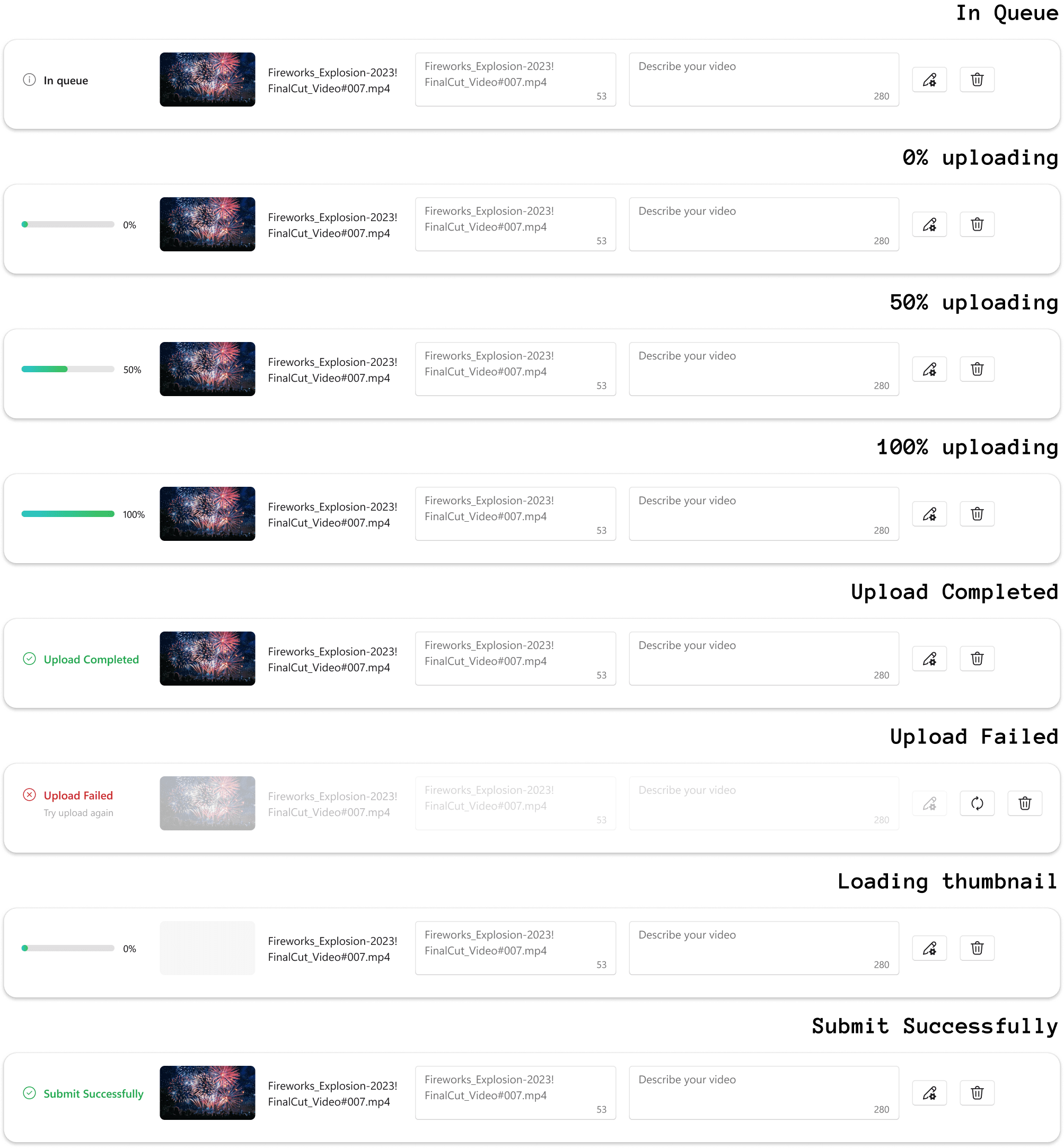
- Pending — selected but not yet started ("I'm in the queue")
- Uploading — actively transferring ("it's happening")
- Submitted — uploaded to server, awaiting publish pipeline ("it's in your hands now")
- Success — published and live ("done, for real")
- Failed — upload or publish failed, with reason ("here's what went wrong")
- Partial Success — some files succeeded, some didn't ("here's the honest picture")
- Retry Available — failed but recoverable ("you can try again")
The critical distinction: Uploading ≠ Submitted. Upload Failed ≠ Publish Rejected. Partial Success ≠ Failed.
Each of these used to be collapsed into a binary. Expanding them meant the system could speak precisely to the user at every step.
The state matrix
The deliverable that made this real wasn't a list of states — it was a two-axis state matrix. Page-level states (which of Add / Submit / Cancel are available) crossed with item-level states (which of edit / delete / metadata are live per file), each cell an explicit enabled/disabled decision. The spec shipped it as a literal dependency table: for every combination, the truth is written down, not implied. "Designing state as language" sounds abstract; a truth table that engineering can implement without guessing is what it looks like in practice.
The push backs
Three design decisions required pushing against default engineering and product assumptions:
1. "Partly failed" pages shouldn't show "0 videos failed"
The engineering default was to render a template uniformly — the failure summary page would always display "X videos failed," even when X was zero. My position: if nothing failed, don't show a failure context. State language must match reality. Showing "0 failed" on a failure-styled page creates cognitive dissonance — the frame says something went wrong, but the content says everything's fine.
2. Submit All tooltip should be intent-based, not automatic
The initial implementation showed a tooltip for the "Submit All" action immediately on page load. My position: tooltips should be triggered by hover or demonstrated intent, not forced as system narration. Help should be discoverable when the user needs it, not broadcast as ambient noise. This is the difference between guidance and interruption.
3. A full 50-video batch must not break the layout
When I raised the question of what happens at the 50-file batch limit, the initial response was that it's an edge case — handle it later. My position: if you ship a batch feature, you're making a promise about scale. A full batch isn't an edge case; it's the reason the feature exists. If the UI degrades at the volumes it was designed for, the feature hasn't shipped — it's just been demoed.
The words got the same treatment
Every user-facing string went through a dedicated copy review, and the standard was user intent, not system description. One example that stuck with me: the disabled Submit button's tooltip originally read "Please upload the video first" — technically accurate, but it describes the system's requirement. It shipped as "Upload a video to submit" — the user's goal, with the path to it. The same discipline governed the batch ceiling: at the 50-video limit, instead of a dead disabled button, the Add action explains itself — submit these, then add more. State language, button language, tooltip language — all one voice.
The design principle underneath
All three push backs pointed to the same principle: status is not an implementation artifact — it's a user interface. Every state, every label, every page frame is a sentence the system speaks to the user. If the sentence is wrong, vague, or contradicts itself, the user stops trusting the system. In B2B tools where people's jobs depend on the output, that trust is everything.
Chapter 3 — Designing for Scale
With the state model defined, the design work expanded into the full upload experience across all scales.
The flow
File selection → Upload + Metadata editing → Submit → Result
A key design decision was allowing users to edit metadata and submit while files are still uploading. Rather than forcing a sequential workflow — wait for all uploads to finish, then edit, then submit — the upload page combines three activities in one view:
- Monitor upload progress — each file shows real-time status (progress bar, In queue, Upload Completed, Upload Failed)
- Edit metadata inline — title, abstract, tags can be edited per file, or bulk-applied across selected files
- Submit when ready — users can hit Submit before all uploads finish; the system handles the rest
This parallel workflow was critical for scale. With 50 files, waiting for every upload to complete before doing anything else would mean minutes of dead time. Letting users work while the system works means the batch experience actually respects their time.
The result page
The result page surfaces two layers of outcome simultaneously: upload results and submit results. Because users can submit while uploads are still in progress, the final state of any given file depends on what happened at both stages.
The page handles three terminal states:
- All succeeded — clean confirmation: "50 videos were submitted for moderation review"
- All failed — clear failure with actionable next step: retry as batch or submit individually from Drafts
- Partly failed — the most complex case. The page separates files by failure reason: upload failures ("Try uploading them again") vs. submit failures ("Try submitting them again or submit each video individually in Drafts"), with successful files summarized separately
This separation matters because the user's next action depends on where the failure happened. An upload failure means the file never reached the server — retry the transfer. A submit failure means the file uploaded fine but something went wrong in the publishing pipeline — different problem, different fix. Collapsing these into a generic "failed" would leave users guessing what to do.
There was even a third failure class users never see: a file that uploads fine but fails to save as a draft in the backend. The front end retries it silently and only surfaces the problem if it still matters at submit time — because a failure the system can fix itself shouldn't become the user's job. Deciding which failures deserve the user's attention is as much a part of state design as naming the states.
One more detail from the same principle: on any partial-failure view, failed items are ranked to the top of the list — the list is sorted by what needs your action, not by upload order.
Designing for a full batch
I designed for the realistic ceiling: the 50-file batch limit (set with engineering as a front-end performance decision). This meant:
- Bulk metadata editing — select multiple files, apply tags/categories/descriptions in one action, rather than editing 50 files one by one
- Visual grouping by status — files grouped by state (uploading, completed, failed) so the list doesn't become an undifferentiated wall
- Scannable state indicators — status labels and icons designed to be readable at a glance even in a long scrolling list
- Pagination — the platform uses paginated views rather than infinite scroll, which is the right call for an audit-oriented workflow where users need to systematically review files
The Figma deliverable was 30+ pages covering interaction states, error paths, edge cases, and responsive variations.
Chapter 4 — Impact & Reflection
Metrics
- 70%+ average growth in onboarded push videos
- ~20× growth in weekly video volume
- Design approach shared in weekly team meetings, influenced the team's approach to state modeling in other features
What I learned
In B2B tools, trust comes from precision. Vague success is almost as bad as hidden failure. When a publisher uploads 40 videos and the system says "done" without specifics, they don't feel confident — they feel anxious. Granular state feedback isn't a nice-to-have; it's what makes the tool trustworthy enough to rely on.
"Edge cases" in batch systems are the center of the value proposition. The whole point of batch is scale. If you don't design for the high end, you haven't designed the feature — you've designed a demo.
State architecture is a design artifact. If you let engineering define states, they optimize for implementation simplicity. If design defines states, you optimize for user comprehension. Both are valid concerns, but the user-facing states should be authored by the person who understands what users need to believe about the system at each moment.